Windows EXE and ZIP apps: Troubleshooting issues
In some cases, installing Windows EXE or ZIP apps on target devices can result in errors.
- When you install an uploaded EXE or ZIP app to a target Windows device, the path to the file includes the app's product GUID and the file name. For example:
C:\ProgramData\Quest\KACECloud\clouddeploy\ca36746d-386c-442e-833d-fdbeb771ea2c-beeftext-16_0-installer_exe-233A8EBF\ca36746d-386c-442e-833d-fdbeb771ea2c-beeftext-16.0-installer.exe
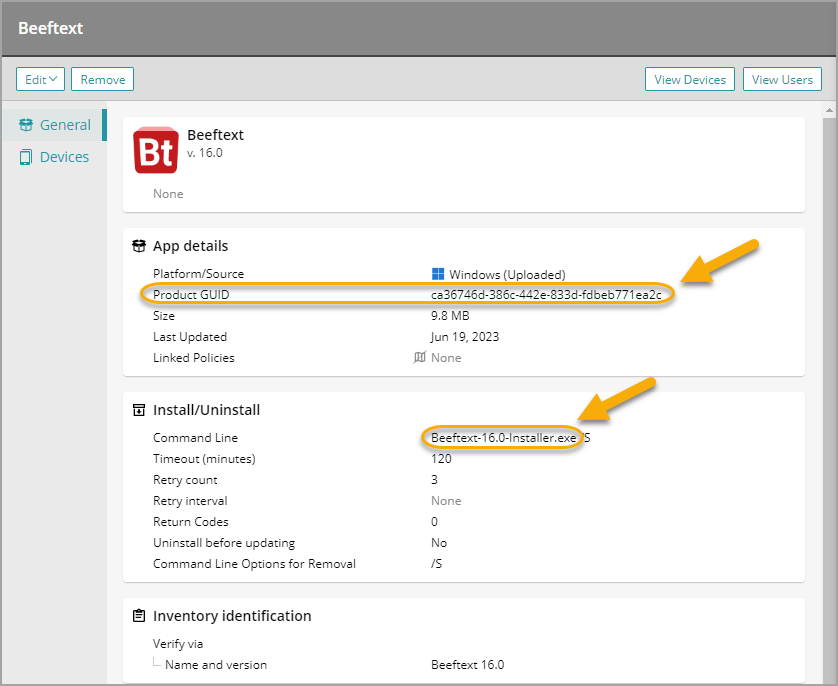
Windows ZIP apps follow the same path structure, with their contents extracted. For example:
C:\ProgramData\Quest\KACECloud\clouddeploy\9ed8a07a-0352-4c3d-8c0f-c89f66608823-ax_zip-B36DDC23
To investigate further, review the following KACE Cloud Agent log files on the target Windows device:
C:\ProgramData\Quest\KACECloud\logs\clouddeploy.log
C:\ProgramData\Quest\KACECloud\logs\kacecloud.log
-
Attempting to install an EXE or ZIP app on device with incorrect date results in a failure. Before installing apps, always make sure that the target device has the correct date set.